A simple demonstration of coregionalisation
This notebook shows how to construct a multi-output GP model using GPflow. We will consider a regression problem for functions \(f: \mathbb{R}^D \rightarrow \mathbb{R}^P\). We assume that the dataset is of the form \((X_1, f_1), \dots, (X_P, f_P)\), that is, we do not necessarily observe all the outputs for a particular input location (for cases where there are fully observed outputs for each input, see Multi-output Gaussian processes in GPflow for a more efficient implementation).
For this problem, we model \(f\) as a coregionalised Gaussian process, which assumes a kernel of the form:
The covariance of the \(i\)th function at \(x\) and the \(j\)th function at \(y\) is a kernel applied at \(x\) and \(y\), times the \(i, j\)th entry of a positive definite matrix \(B\). This is known as the intrinsic model of coregionalisation (ICM) (Bonilla and Williams, 2008).
To make sure that B is positive-definite, we parameterise it as:
To build such a model in GPflow, we need to perform the following two steps:
Create the kernel function defined previously, using the
Coregionkernel class.Augment the training data X with an extra column that contains an integer index to indicate which output an observation is associated with. This is essential to make the data work with the
Coregionkernel.
[1]:
import gpflow
import numpy as np
import matplotlib
%matplotlib inline

matplotlib.rcParams['figure.figsize'] = (12, 6)
plt = matplotlib.pyplot
from gpflow.test_util import notebook_niter
np.random.seed(123)
Data preparation
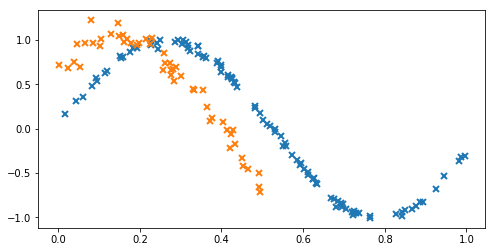
We start by generating some training data to fit the model with. For this example, we choose the following two correlated functions for our outputs:
[2]:
# make a dataset with two outputs, correlated, heavy-tail noise. One has more noise than the other.
X1 = np.random.rand(100, 1) # Observed locations for first output
X2 = np.random.rand(50, 1) * 0.5 # Observed locations for second output

Y1 = np.sin(6*X1) + np.random.randn(*X1.shape) * 0.03
Y2 = np.sin(6*X2+ 0.7) + np.random.randn(*X2.shape) * 0.1

plt.figure(figsize=(8, 4))
plt.plot(X1, Y1, 'x', mew=2)
plt.plot(X2, Y2, 'x', mew=2);
Data formatting for the coregionalised model
We add an extra column to our training dataset that contains an index that specifies which output is observed.
[3]:
# Augment the input with ones or zeros to indicate the required output dimension
X_augmented = np.vstack((np.hstack((X1, np.zeros_like(X1))), np.hstack((X2, np.ones_like(X2)))))

# Augment the Y data
Y_augmented = np.vstack((np.hstack((Y1, np.zeros_like(Y1))), np.hstack((Y2, np.ones_like(Y2)))))
Building the coregionalisation kernel
We build a coregionalisation kernel with the Matern 3/2 kernel as the base kernel. This acts on the leading ([0]) data dimension of the augmented X values. The Coregion kernel indexes the outputs, and acts on the last ([1]) data dimension (indices) of the augmented X values. To specify these dimensions, we use the built-in active_dims argument in the kernel constructor. To construct the full multi-output kernel, we take the product of the two kernels (for a more in-depth tutorial on
kernel combination, see Manipulating kernels).
[4]:
output_dim = 2 # Number of outputs
rank = 1 # Rank of W
k1 = gpflow.kernels.Matern32(1, active_dims=[0]) # Base kernel
coreg = gpflow.kernels.Coregion(1, output_dim=output_dim, rank=rank, active_dims=[1]) # Coregion kernel
coreg.W = np.random.rand(output_dim, rank) # Initialise the W matrix
kern = k1 * coreg
Note: By default, the W matrix is initialised with zeros; however, this is a saddle point in the objective, so the value of W is not optimised to fit the data. Hence, re-initialising the matrix to random entries should give a more accurate result.
Constructing the model
The final element in building the model is to specify the likelihood for each output dimension. To do this, use the SwitchedLikelihood object in GPflow.
[ ]:
# This likelihood switches between Gaussian noise with different variances for each f_i:
lik = gpflow.likelihoods.SwitchedLikelihood([gpflow.likelihoods.Gaussian(), gpflow.likelihoods.Gaussian()])

# now build the GP model as normal
m = gpflow.models.VGP(X_augmented, Y_augmented, kern=kern, likelihood=lik, num_latent=1)
# Here we specify num_latent=1 to avoid getting two outputs when predicting as Y_augmented is 2-dimensional

# fit the covariance function parameters
gpflow.train.ScipyOptimizer().minimize(m, maxiter=notebook_niter(1000))
That’s it: the model is trained. Let’s plot the model fit to see what’s happened.
[6]:
def plot_gp(x, mu, var, color, label):
    plt.plot(x, mu, color=color, lw=2, label=label)
    plt.fill_between(x[:, 0],
                     (mu - 2*np.sqrt(var))[:, 0],
                     (mu + 2*np.sqrt(var))[:, 0],
                     color=color, alpha=0.4)

def plot(m):
    plt.figure(figsize=(8, 4))
    xtest = np.linspace(0, 1, 100)[:,None]
    line, = plt.plot(X1, Y1, 'x', mew=2)
    mu, var = m.predict_f(np.hstack((xtest, np.zeros_like(xtest))))
    plot_gp(xtest, mu, var, line.get_color(), 'Y1')

    line, = plt.plot(X2, Y2, 'x', mew=2)
    mu, var = m.predict_f(np.hstack((xtest, np.ones_like(xtest))))
    plot_gp(xtest, mu, var, line.get_color(), 'Y2')

    plt.legend()

plot(m)
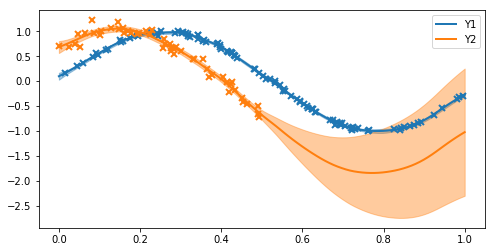
From the plots, we can see:
The first function (blue) has low posterior variance everywhere because there are so many observations, and the noise variance is small.
The second function (orange) has higher posterior variance near the data, because the data are more noisy, and very high posterior variance where there are no observations (x > 0.5).
The model has done a reasonable job of estimating the noise variance and lengthscales.
The model recognises the correlation between the two functions and is able to suggest (with uncertainty) that because x > 0.5 the orange curve should follow the blue curve (which we know to be the truth from the data-generating procedure).
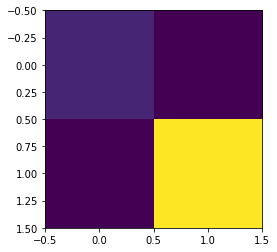
The covariance matrix between outputs is as follows:
[7]:
B = coreg.W.value @ coreg.W.value.T + np.diag(coreg.kappa.value)
print('B =', B)
plt.imshow(B);
B = [[3.10552457 2.9025773 ]
 [2.9025773  4.83607491]]
References
Bonilla, Edwin V., Kian M. Chai, and Christopher Williams. “Multi-task Gaussian process prediction.” Advances in neural information processing systems. 2008.